SSG, SSR, SPA...
If you’re new to the JavaScript ecosystem, you might have come across these acronyms before but aren’t yet familiar with them. Don’t sweat; by the end of this, you’ll not only know their meaning, but I also hope to provide a good mental model for how they work.
SSG
SSG, or static site generation, is the programmatic process of generating, compiling, and optimizing a website’s scripts, markup, styles, assets, and into static files the . The paradigm isn’t new; if you’re familiar with tools like Jekyll, you’re in a good spot. The implementation details vary from framework to framework, but the general process goes something like this:
Excuse my horrible excalidraw skills XD
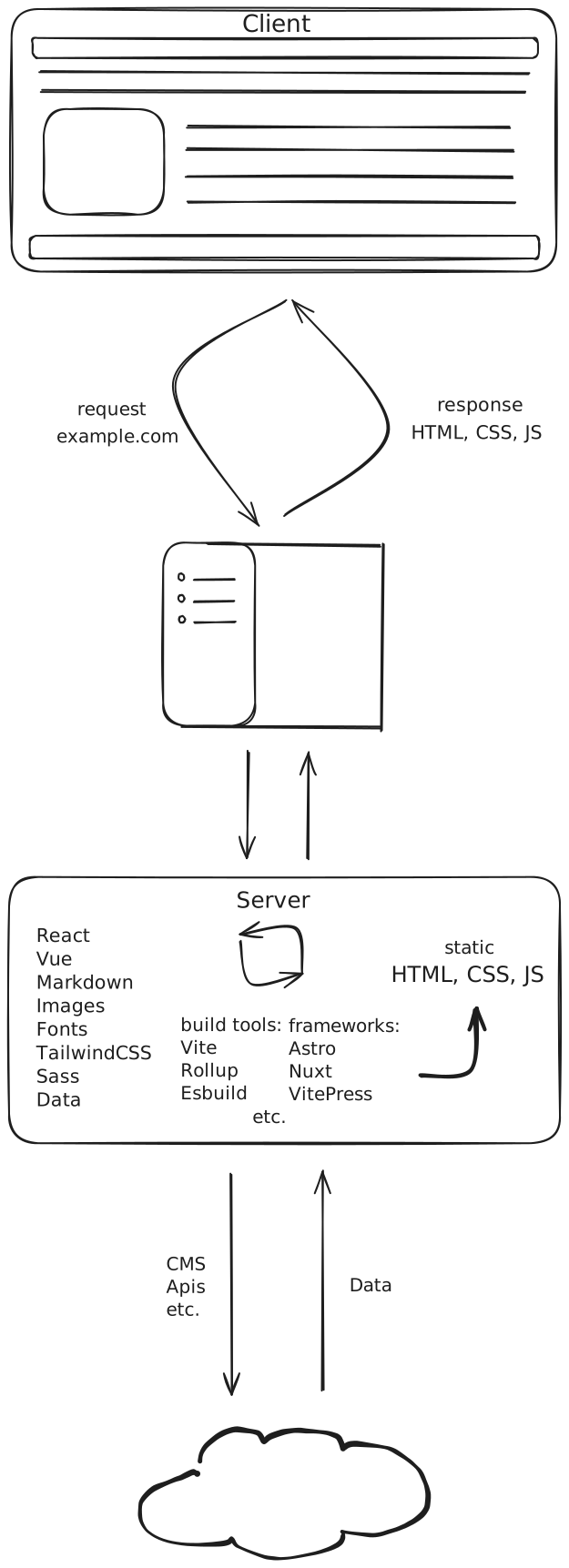
In the traditional client-server model, user-created are stored in a directory on the server and requested by the browser. But with static site generation, these files are generated, compiled and optimized for you programmatically, then output in a directory ready for deployment. This process involves using build tools such as Vite, Rollup, and ESbuild within a JavaScript server-side runtime such as Node.js. Most modern JavaScript frameworks have this capability built in and have fine-tuned this process for maximum efficiency. You can also find hosting providers that can initiate the programmatic step when certain conditions are met, like commits to production branches in Git or via webhooks.
SSR
SSR, or server-side rendering, is the process of generating or compiling pages or routes of a website dynamically on the server when requested by the browser. Unlike SSG, where a website is compiled into static files in its entirety during a single build process. Server-side rendering builds pages or routes of a website on request. You can think of it like this:
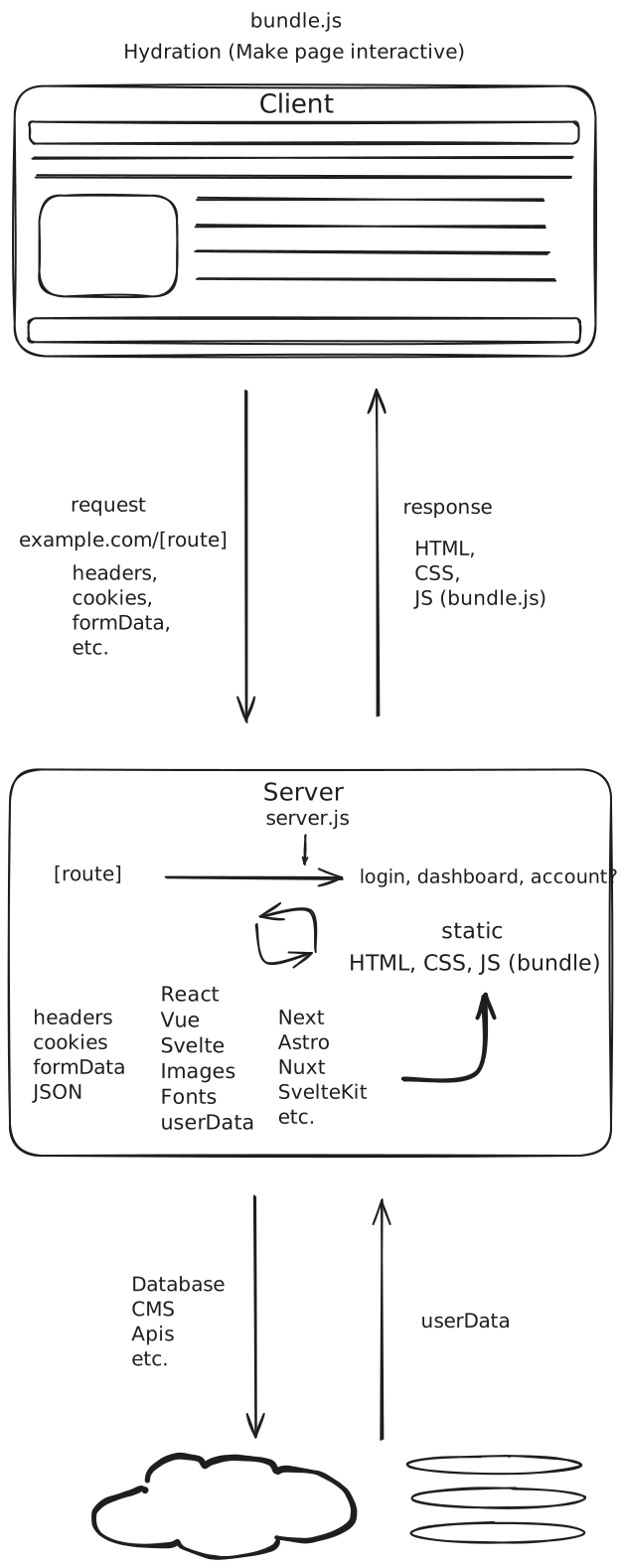
As before the implementation details vary across frameworks, but the process is very similar to SSG. At request time, the server generates HTML from fetched data and compiled code, and responds with the newly generated HTML, including any CSS and a JS bundle used by the client in a step called . This step involves using the to compare the HTML sent and, depending on the chosen framework, use the , which mirrors the HTML received, to attach any event listeners. As this is just a high-level explanation, I won’t be covering Hydration in depth. However, I recommend a deep dive into Hydration, as it could help you avoid dreaded errors that can happen during this phase.

SPA
SPA, or single-page application, is a dynamic, interactive website that’s compiled and bundled using the previously mentioned build tools into a single, well-optimized JS bundle. It’s similar to SSG in that it performs this build step once using a server-side runtime, and then prepares the build for deployment. However, it differs from SSG in that a SPA can dynamically update its content via AJAX requests. Here’s how that looks:
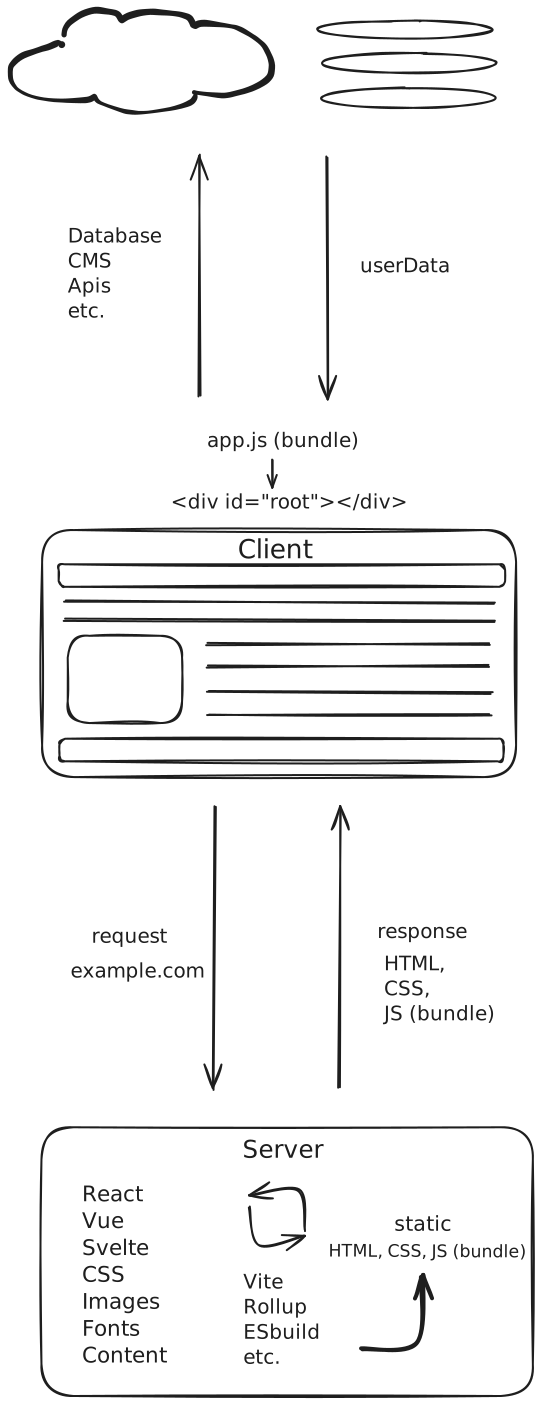
Unlike a SSG website, where pre-generated HTML documents are created for each page route. In a single-page application, the server responds with a single HTML document containing an HTML element where the JS bundle can attach and begin building out the DOM. Once the DOM has been parsed, any initial and future dynamic content is fetched asynchronously via HTTP requests, and all page routing is done client-side, removing the need for additional round-trip requests to the server.
For the better part of a decade, SPAs have been the go-to for building dynamic interactive websites; however, SSR has been gaining popularity due to its SEO-friendliness and, arguably, a slightly better UX due to reduced reliance on loading indicators and server-side rendering, while SSG has been a popular choice for mostly websites.
Like most technologies, each option has its tradeoffs, and I recommend doing a deeper dive into how they work. I have some great resources linked under my bookmarks section if you’re curious. I hope this helped provide a high-level overview of how these web methodologies work.