The Different Pillars of User Authentication
User authentication on the web has evolved from Basic authentication to session-based authentication, OAuth 2.0 with OpenID Connect, and more recently passwordless flows. As developers are increasingly expected to be generalists, it helps to have a strong mental model of the major methods and where each one fits.
If most of your experience has been in front-end development, or you are just diving into authentication, this is meant to be a practical introduction.
Basic Authentication
Since the early web, one of the traditional authentication methods has been HTTP Basic authentication. It is part of the HTTP authentication framework and involves sending a user’s credentials (username and password) in the Authorization header.
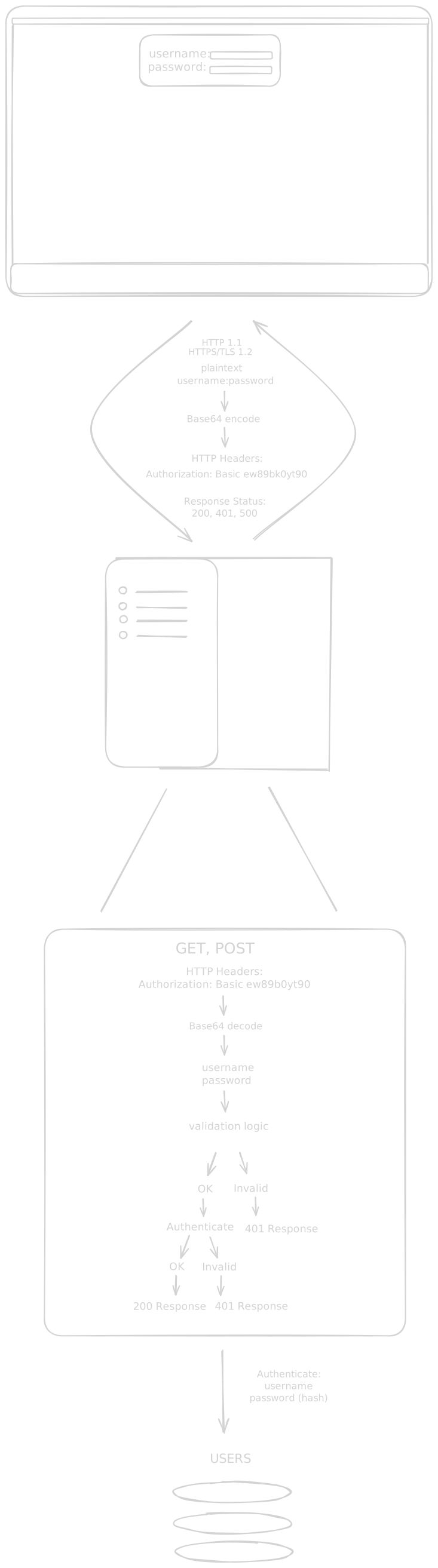
The credentials are concatenated with a colon, then Base64-encoded. They are sent with every request and validated on every request, without a server-side session or persistent login state.
Basic authentication pitfalls you should consider.
- Base64 encoding is reversible. Base64 is encoding, not encryption. If traffic is intercepted without TLS, credentials can be decoded easily. HTTPS must be strictly enforced.
- Brute-force attacks. Attackers may repeatedly submit credential guesses (dictionary attacks or brute-force attempts) to gain access. Mitigate with rate limiting, bot protection, progressive delays, and lockout policies.
- Credentials are sent with every request. Since credentials are sent with each request, there are more opportunities for interception.
Session-based Authentication
A more common modern approach is form-based login with server-managed sessions. A session is how a server maintains state for a user across multiple requests.
Unlike Basic authentication, credentials are submitted once at sign-in. The server validates them, creates a session ID, associates it with the user (plus optional metadata), and stores it in a session store (database, cache, or memory). That session ID is sent back to the browser in a cookie and included in subsequent requests.
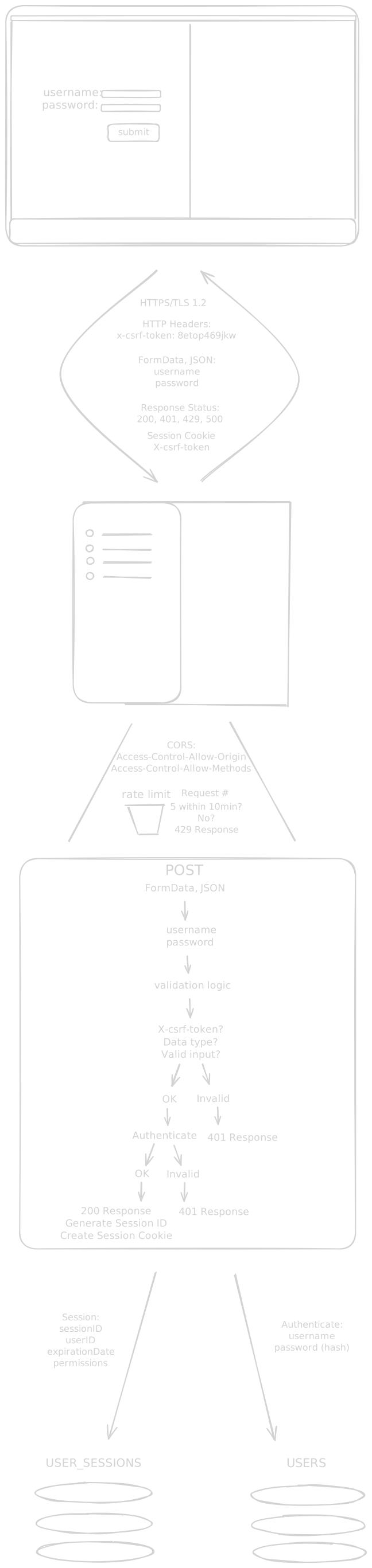
Things to consider when working with session-based authentication:
- Passwords must be properly hashed. Never store plaintext passwords. Use strong hashing algorithms like bcrypt, Argon2, or scrypt with an appropriate salt.
- CSRF attacks. If proper protections are not in place, cookie-based sessions can be vulnerable to CSRF. Mitigations include anti-CSRF tokens,
SameSitecookies, and Fetch Metadata validation. (CORS is related to browser access control, but it is not a standalone CSRF defense.) - Brute-force attacks. Session-based auth is also vulnerable to brute-force attempts, so protections similar to Basic auth should be applied.
- Session cookies must be secured. Configure cookies with:
HttpOnlyflag (prevents JavaScript access)Secureflag (only transmitted over HTTPS)SameSiteattribute (helps prevent CSRF)
- Session management. Implement proper session expiration, renewal, and invalidation (especially on logout or password change).
JWT
JWT (JSON Web Token) is a token format, not an authentication protocol by itself. It is often used to carry claims for authentication and authorization after a user has already signed in.
With session-based auth, the server typically looks up session state on each request. With signed JWTs, the server can validate the token signature and claims without a central session lookup (depending on architecture). This can reduce server-side state, but introduces tradeoffs around revocation and lifecycle management.
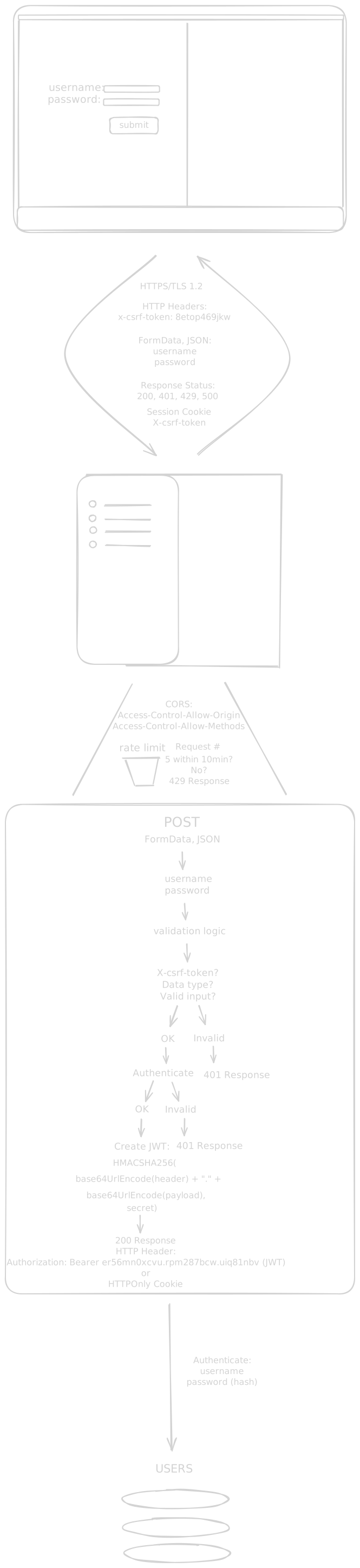
JWTs consist of three parts: Header, Payload, and Signature.
- Header: Contains metadata such as token type (
JWT) and signing algorithm (HS256,RS256,ES256, etc.) - Payload: Contains claims (for example
sub,iss,aud,exp, plus application-specific claims) - Signature: Verifies integrity and authenticity by signing the encoded header and payload with the configured key and algorithm
Important note: JWT payloads are Base64URL-encoded, not encrypted by default, so claims can be read by anyone who has the token.
Once issued, JWTs are commonly sent in the Authorization header (Bearer token) or via secure HttpOnly cookie, depending on the architecture.
Things to consider when working with JWTs:
-
Token invalidation. Unlike a session flow where sessions are easy to revoke centrally, self-contained JWTs usually remain valid until expiration unless you implement revocation logic (deny lists, token versioning, short TTLs, rotation).
-
Data in payload. Do not place sensitive secrets in claims (passwords, private API keys, internal security data).
-
Key management and algorithm safety. Protect signing keys, rotate them safely, and strictly validate accepted algorithms.
OAuth 2.0 w/ OpenID Connect
OAuth 2.0 is an authorization framework for delegated access to protected resources (for example, calling a third-party API on a user’s behalf). OpenID Connect (OIDC) is an identity layer built on top of OAuth 2.0 that adds standardized authentication.
Together, OAuth 2.0 + OIDC are commonly used for social login and enterprise SSO. This lets teams offload credential handling and large parts of the login flow to identity providers.

In this model:
client_ididentifies your app with the provider.- Access tokens authorize API/resource access.
- ID tokens (OIDC) carry identity claims about the authenticated user.
- Refresh tokens can be used to obtain new access tokens.
Storage strategy depends on your architecture (backend-rendered app, SPA + BFF, native app, etc.), but token handling should always minimize exposure and follow provider guidance.
While OAuth 2.0 + OIDC provide a secure and convenient path to authentication, there are tradeoffs:
- You are somewhat vendor-locked to the third party, as they manage the authentication flow.
- If a user loses access to the third-party account, account recovery in your app can be harder unless you offer additional sign-in methods.
Typically, in large production applications, both session-based and OAuth 2.0 methods of authentication are provided for this reason.
Passwordless
Passwordless authentication verifies users without asking them to memorize a password. Common approaches include passkeys (WebAuthn), magic links, one-time passcodes, and device biometrics.
Not all passwordless methods have the same security properties, so it is helpful to separate them.
Magic links
A magic link sends a one-time URL to a user’s email address. Clicking the link proves control of that mailbox and can complete sign-in.
The process involves generating a URL that includes a unique indentifier as a parameter that can be verfied once the user clicks the link.
One-time passcodes
One-time passcodes (OTP) follow a similar approach to magic links, but instead of a link, the user enters a short code (often six digits) delivered via email or SMS within a limited time window.
Passkeys (WebAuthn/FIDO2)
Passkeys use public-key cryptography and are currently one of the strongest phishing-resistant options for consumer login. Biometric checks (Face ID, fingerprint, device PIN) usually unlock a private key stored securely on the user’s device. The server only stores a public key.
For many applications, passkeys are a great primary login method when paired with thoughtful account recovery flows.
Biometric
Biometric authentication uses a fingerprint or face scan to verify user presence on a device. In web apps, biometrics are typically part of passkey/WebAuthn flows rather than a standalone server-side authentication method.
Each method has strengths and tradeoffs. Passwordless can improve UX (no passwords to remember), but implementation details matter.
- It can add extra user steps (switching apps/devices, retrieving codes, recovery flows).
- Email links/codes can be delayed, filtered, or blocked.
- SMS OTP can be vulnerable to SIM-swap and interception attacks.
- Device or biometric failures can create account recovery friction without fallback paths.
In short, passwordless is not automatically the most secure option in every case. Well-implemented passkeys are generally among the strongest phishing-resistant approaches, while email/SMS-based methods are more convenient but usually weaker against targeted attacks.